.avif)

Small businesses that handle cardholder data must follow requirements in PCI DSS to protect customer data, avoid costly fines, and maintain trust with payment processors. Our guide explains which PCI DSS level your business falls under and provides a practical checklist covering firewalls, encryption, MFA, patching, physical security, monitoring, vulnerability scanning, and penetration testing. Read on to learn about common compliance mistakes, key updates in PCI DSS 4.0.1, and the tools and resources that can streamline audits and ongoing security.
Becoming PCI DSS compliant means storing only the necessary amount of information required for specific business purposes and taking the right steps to encrypt and securely store all card data deemed necessary to keep. All merchants and service providers should follow PCI DSS requirements to enforce data minimization, prevent data leakage, reduce potential costs, and appease payment processors. Below, we explore why these measures matter specifically to small businesses, the rules you need to follow, and a complete PCI DSS compliance checklist to ensure you are fully compliant.
Why PCI DSS Matters for Small Businesses
PCI DSS’s rules help small businesses to better protect sensitive card data against cyberattacks and data leakage. Specifically, following PCI DSS requirements helps smaller firms to avoid costly fines, build and maintain trust with customers, and support a more robust infrastructure against evolving threats.
As the PCI Security Standards Council states, PCI compliance establishes the absolute minimum businesses should follow to safeguard data. And, they cover a broad range of:
“entities that store, process, or transmit cardholder data (CHD) and/or sensitive authentication data (SAD) or could impact the security of the cardholder data environment (CDE). This includes all entities involved in payment card processing – including merchants, processors, acquirers, issuers, and service providers.”
PCI SSC
With that in mind, small businesses are at higher risk than others from collapse should sensitive cardholder data be exposed, largely because the costs of exposure hit growing firms harder. Potential ramifications might include:
- Penalties imposed by processors (which can escalate rapidly)
- Restrictions applied by processors (such as loss of card processing or higher transaction costs)
- Loss of customer and business trust
- Legal action from customers whose data is stolen or leaked
- Closure of your business through loss of trade and revenue
The PCI DSS requirements serve as baseline security template to ensure small businesses tighten up their data security and avoid expenses, loss of reputation, legal action, and even closure.
Staying PCI DSS compliant also shows businesses and customers you care about data protection, and that you can be trusted as a trade partner and a direct seller. We recommend all small business owners focus on PCI DSS compliance as a priority as soon as they start processing card data.
Which PCI DSS Rules Apply to Your Business?
PCI DSS splits merchants and service providers into different compliance levels based on how many card transactions they process annually. It’s important to determine which merchant or service provider level your business falls under so that you know which rules to follow.
We’ve put together a complete guide to PCI compliance levels in another blog with more information, but here’s a quick overview of the levels for merchants:
- Level One merchants process more than six million card transactions annually across all payment acceptance channels. They must engage a Qualified Security Assessor (QSA) to complete an annual onsite assessment resulting in a Report on Compliance (ROC) and Attestation of Compliance (AOC). They must also carry out quarterly vulnerability scans performed by an Approved Scanning Vendor (ASV).
- Level Two merchants process between one and six million card transactions annually. They may complete a Self-Assessment Questionnaire (SAQ) and attest to their own compliance. They must also complete quarterly vulnerability scanning by an ASV. Acquirers may require a full QSA assessment and ROC for some level 2 merchants.
- Level Three merchants process between 20,000 and one million e-commerce transactions annually. They must complete an SAQ and an AOC, and conduct quarterly vulnerability scans.
- Level Four merchants include e-commerce merchants processing fewer than 20,000 transactions annually, as well as other merchants processing up to one million transactions. They must complete an SAQ and AOC, and conduct quarterly ASV scans if they have external facing systems.
There are two separate levels for service providers:
- Level One providers store, process, or transmit more than 300,000 transaction annually. They must complete an annual assessment by a QSA resulting in a Report on Compliance (ROC), submit an Attestation of Compliance (AOC), and undergo quarterly ASV scans and annual penetration testing.
- Level Two providers handle fewer than 300,000 transactions annually. They must complete an annual Self-Assessment Questionnaire (SAQ-D), submit an AOC, and undergo quarterly ASV scans and annual penetration testing.
The Complete PCI DSS Compliance Checklist
You should review the 12 PCI DSS compliance requirements to secure cardholder data. Below, we’ve compiled actionable steps you must take to ensure you meet these requirements and maintain compliance.
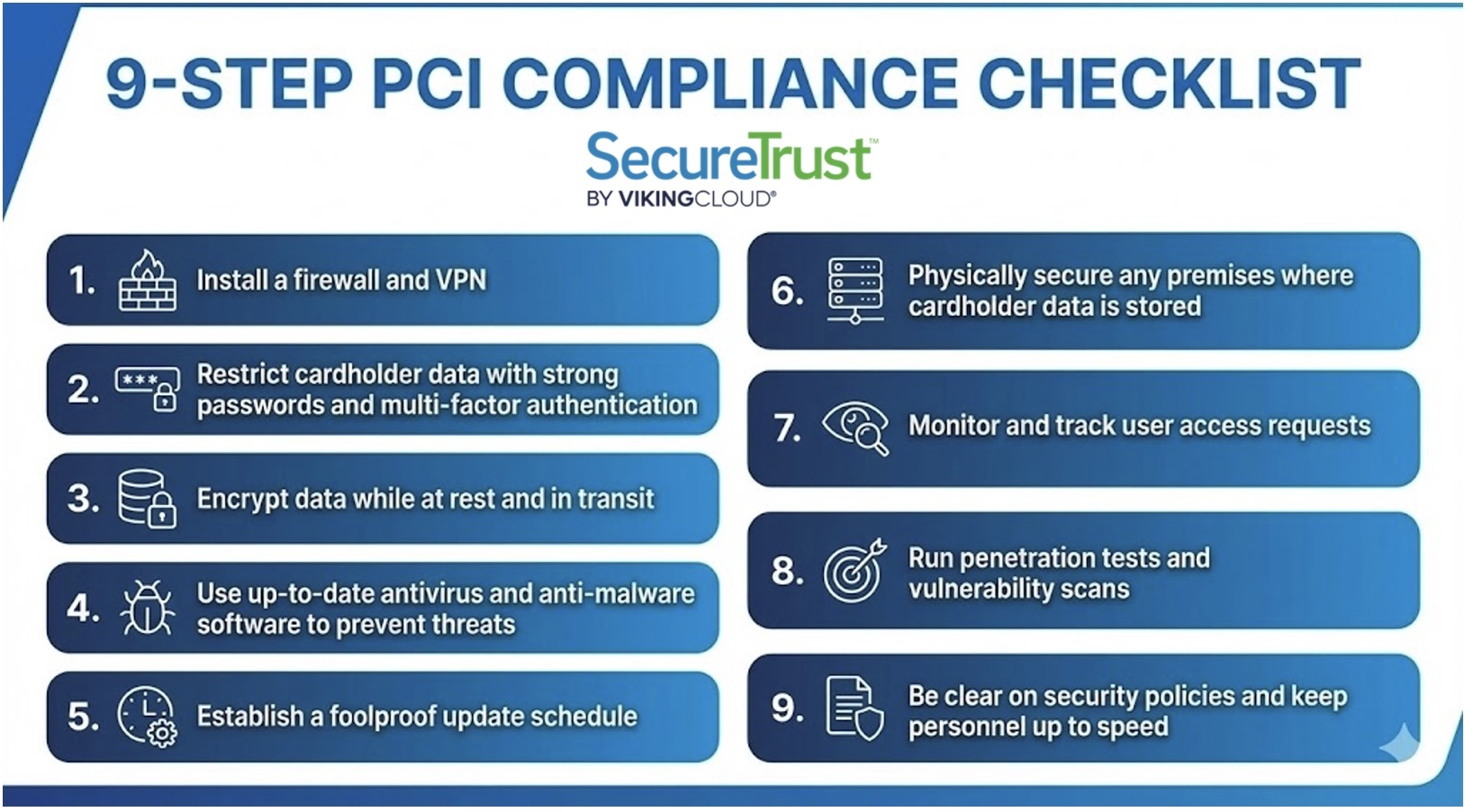
Install a Firewall and VPN
Install a functional firewall solution and set up a Virtual Private Network (VPN) to prevent hackers from piggybacking on your connections.
Configure your firewall and routers to:
- Segment your cardholder data environment (CDE)
- Block unnecessary or unknown traffic
- Secure your network’s endpoints
Restrict Cardholder Data with Strong Passwords and Multi-Factor Authentication
Ensure that all users set and regularly change strong passwords with long, random character strings. CISA’s guide offers useful advice to help you start.
Don’t rely on passwords alone to protect cardholder data. Use multi-factor authentication (MFA), and require users to use a combination of multiple methods to authenticate their identity—something you know (a password), something you have (a token or key card), and/or something you are (biometrics).
Above all, only give data access permissions to users who need them (you should regularly review these permissions, too).
Encrypt Data While at Rest and in Transit
Encrypt all data stored and processed by:
- Using trusted encryption and masking tools to render stored information useless if stolen
- Installing valid security certificates and HTTPS on all public websites
- Running secure payment gateways
- Encrypting all sites and portals to the TLS 1.2 standard (Microsoft no longer supports older versions)
Use Up-to-Date Antivirus and Anti-Malware Software to Prevent Threats
Choose reputable, paid antivirus and anti-malware software, and configure carefully to protect your CDE.
Be sure to:
- Set up autonomous, background scanning
- Run manual scans when new software and hardware are installed
- Use enterprise-standard software for the best level of security
Establish a Foolproof Update Schedule
Create a schedule for updating software and hardware as soon as patches are released, automating changes wherever possible.
Otherwise, ensure there is accountability. Assign personnel to manually update systems regularly so no patches are missed.
At the same time, carefully audit and remove any hardware and software that are no longer supported by updates. It’s also vital to ensure any apps you develop for the web and mobile devices in secure, updated environments.
Physically Secure any Premises Where Cardholder Data is Stored
Lock away servers, computers, drives, and access points with physical access controls. You could secure your data physically with:
- Access card scanning
- Keypads
- Biometrics
- Camera systems
- Sensors
- Access logs
Monitor and Track User Access Requests
Always demand proof of permission and ID to access data, whether physically or digitally, and regardless of the requester’s position, status, or access history. This is known as zero-trust security.
Use File Integrity Monitoring (FIM) to stop the unauthorized alteration of files and data and use Security Information and Event Management (SIEM) systems to analyze request logs and identify potentially malicious activity.
Run Regular Vulnerability Scans and Penetration Tests
Work with a certified cybersecurity vendor to run vulnerability scans and penetration tests multiple times a year, and after every major change to your network.
Doing so reveals hidden weaknesses and thorough remediation advice to help tighten up your security.
We also recommend documenting any changes you make to security controls and data storage. Doing so helps to support security policy reviews and show assessors you are taking steps to stay compliant.
Be Clear on Security Policies and Keep Personnel Up to Speed
Build and maintain a data security policy in plain language that everyone can access and understand.
Establish accountabilities and data protection expectations. Review your public policy regularly, and ensure your staff is regularly trained on the latest threat vectors and best practices.
Implementation Strategies and Best Practices
Effective PCI DSS implementation requires a structured approach: assess your environment for gaps, strengthen access and network controls, follow formal change management, and adopt continuous monitoring and automation. Consistent employee training and strong vendor management are equally critical. Together, these best practices help small businesses maintain security, reduce risk, and ensure long-term PCI DSS compliance.
- Start With a Comprehensive Assessment — Identify security gaps through internal reviews, penetration testing, and third-party assessments. Document findings, prioritize remediation, and validate improvements before your next SAQ or audit.
- Strengthen Access and Network Controls — Core security measures include enforcing access control policies, MFA, and role-based permissions. Combine these with network security controls such as segmentation, firewall rules, and secure configurations.
- Follow Structured Change Control Procedures — All system updates should be governed by documented change control procedures to ensure new risks aren’t unintentionally introduced into your CDE.
- Adopt Continuous Monitoring and Security Automation — Use monitoring solutions and security automation tools to identify suspicious activity, ensure log retention, and support real-time alerting. This offers stronger protection than periodic manual reviews.
- Train Personnel and Build Policy Awareness — Employee training, regular policy reviews, and a clear incident response process improve readiness and reduce human-related risks. PCI DSS is partly technical—but relies heavily on consistent staff behavior.
- Manage Third-Party Risk Carefully — Monitor and evaluate all vendors with access to your systems or cardholder data. Implement strong vendor management practices, including security questionnaires, access controls, and contract updates.
Preparing for PCI DSS Assessment
PCI DSS assessments, whether performed internally or by a Qualified Security Assessor (QSA), require clear documentation, accurate scoping, and organized evidence. This means clearly defining your cardholder data environment, organizing documentation, completing the right assessment forms, and coordinating early with QSAs and Approved Scanning Vendors. Solid preparation streamlines the audit process, reduces delays, and helps ensure a smooth path to compliance.
- Define and Document Your Audit Scope — Begin by mapping your cardholder data environment (CDE), building network diagrams, data flow diagrams, and identifying all systems involved in transmitting, processing, or storing card data. A precise audit scope ensures your assessment is accurate and efficient.
- Gather Required Documentation — Prepare all policies, procedures, and audit trails that demonstrate how your controls work in practice. This includes logs, monitoring records, configuration reviews, and risk assessments. Many businesses use a document library to centralize and tag evidence.
- Complete the Correct Assessment Forms — Depending on your merchant level, you may need to submit a Self-Assessment Questionnaire (SAQ), an Attestation of Compliance (AOC), or—in some cases—an Annual Report on Compliance (ROC) validated by a PCI Qualified Security Assessor (QSA).
- Coordinate with Auditors and ASVs — Work with your Approved Scanning Vendor (ASV) ahead of audit deadlines to complete required quarterly scans. If using a QSA, schedule discussions, walk-throughs, and evidence submissions early to prevent last-minute issues.
Common PCI DSS Mistakes Small Businesses Make
Some of the most common mistakes include storing card data without purpose, using weak passwords, connecting to unsecured network devices, failing to update hardware and software, and avoiding PCI DSS altogether.
- Storing cardholder data isn’t always necessary. Unless your business relies on its retention, save compliance effort and expenses by avoiding retaining data altogether.
- Weak passwords can bring down companies of all sizes, even those more than 150 years old. Hackers can crack simple passwords and pass phrases based on real words within seconds.
- Unpatched hardware and software, again, offer easy routes for malicious attackers. Hackers take time to learn about older code and can exploit it to breach even complex systems.
- Unfortunately, some business owners may feel that PCI DSS doesn’t apply to them. While the compliance standards are not legally mandated, global payment processors take them very seriously, and will penalize any businesses that fail to comply.
What SMBs Need to Know About PCI DSS 4.0.1
PCI DSS 4.0.1 is the latest base version of the compliance requirements, now in full effect as of March 31, 2025. Changes were made to make security checks a continuous process for businesses of all sizes, and to improve payment validation and security flexibility.
As of 2025, all businesses processing cardholder data should be following PCI DSS 4.0.1. Ultimately, small business owners should take the time to understand the latest PCI DSS documentation and take steps to ensure they take a continuous approach to security, rather than letting compliance lapse or relying on sporadic checks.
Conclusion
Small businesses cannot afford to lose business, customers, reputation, or money in the current climate. To avoid risking all of these factors, it’s vital to secure any cardholder data you handle and process in line with PCI DSS, the global security standard.
Getting PCI DSS compliant can be complex and time-consuming. Save on unnecessary time spent away from your business and rely on SecureTrust PCI Manager to help you protect your customers’ data effectively.
PCI DSS Compliance Getting Started Guide

Senior Product Marketing Manager
SecureTrust

More Blogs
.jpg)